 MDES
How to use WhatsApp sales to build valuable customer journeys
October 27, 2026 · 12 min read
WhatsApp marketing is more than sending promotions. It uses business messaging to answer questions, share relevant offers, support purchases, and stay connected with customers. This WhatsApp sales guide explains how to make those conversations part of the customer journey, rather than a stream of messages people ignore.
The appeal is clear: customers can ask questions and get help in a familiar chat. But simply being available is not enough. Useful messaging depends on timing, relevance, and a clear next step.
Build a practical approach with customer segmentation, automation, and chatbots, while keeping live agents involved when a conversation calls for judgment or a personal touch. This guide covers welcoming and following up with prospects, supporting customers after a purchase, and improving the journey over time. Start with a simple plan, then make every message earn its place.
Key Takeaways
- Build WhatsApp around useful customer conversations, with clear next steps instead of sending messages just to stay visible.
- Map the journey from first question to after-sales support, then use timely, relevant communication to help customers move forward.
- Automate routine tasks and segment audiences, but keep live agents ready for questions that need context, judgment, or a personal response.
- Use a practical playbook to turn these ideas into a repeatable sales process, then improve it based on how customers respond.
Table of Contents
- What is WhatsApp marketing?
- Customer lifetime value and real-time communication
- Automation, segmentation, and customer journeys
- Live-agent support and chatbots
- MDES Digital (Magehema Digital Entrepreneurship System): WhatsApp Mobile Sales Playbook
What is WhatsApp marketing?
WhatsApp marketing uses business messages to answer questions, share offers, and support sales. A WhatsApp sales guide should treat every message as part of a useful customer conversation, not as a reason to broadcast more often.
-
Set up WhatsApp Business for sales
Create a WhatsApp Business profile with clear business details, then organize product information and common answers. Use approved message templates for proactive updates outside the 24-hour customer service window. For US phone numbers, marketing template delivery remained paused as of July 2026, while replies inside that service window were allowed. Best practice: make each message specific, helpful, and easy to answer.
-
Collect customer opt-ins and follow messaging restrictions
Get customers’ opt-in before sending marketing messages, and record what they agreed to receive. Explain the purpose at signup, such as product offers or order updates. Stop sales messages when someone opts out. For example, a checkout form can request consent for promotional messages separately from essential order updates. Regional requirements may also affect consent for marketing messages.
-
Connect WhatsApp with sales platforms
Connect WhatsApp with your CRM or ecommerce platform so staff can use relevant customer and order details. Map each event to an appropriate message, such as sending a purchase update when an order is placed. Test that consent status and opt-outs carry through the connection. Collect only the information needed to recommend a suitable next step. A practical WhatsApp sales guide ties data use to a clear customer need.
-
Plan messages and review delivery
Choose message timing and volume based on customer actions, then review delivery, opens, replies, and conversions. WhatsApp carries 65 billion messages daily, and 90% of messages are opened within 30 minutes. Messages sent during the 72 hours after a customer starts a chat from a Click-to-WhatsApp ad are free to deliver. Since October 1, 2026, free-form service replies are billed per message after the first 1,000 per business phone number each month. AI can draft or sort messages, but review accuracy, consent, and relevance before sending. Compare outcomes by audience and message type, then revise or pause messages that prompt complaints.
Customer lifetime value and real-time communication
Use timely, relevant conversations to encourage customers to return, not just complete one purchase. Build each message around a customer need and a useful next step.
-
Use real-time communication to support customer value
Respond to customer questions while their needs are clear, then follow through after purchase with practical support. Existing customers account for 72% of company revenue, so the relationship matters beyond the first sale. Adding WhatsApp to a wider channel mix was associated with a 137% increase in average user lifetime. Treat that as an association, not a promise: useful service and consistent follow-up give customers a reason to stay engaged.
-
Segment customers for personalised follow-ups
Group your audience by meaningful actions, such as viewing a product, asking about delivery, or placing an order. Then tailor follow-ups to that context. A recent buyer may value setup advice, while someone who asked about a product may need a direct answer before deciding. Invite customers to opt in through clear signup points, explain what messages they’ll receive, and make opting out straightforward. Don’t add someone to a broadcast just because they contacted your business once.
-
Support customers through conversational commerce
Use each conversation to guide, not pressure. Answer product questions, explain available options, and state pricing and any relevant conditions clearly before a customer decides. After the sale, provide support that helps resolve problems and use customer feedback to improve the next interaction. Keep a person involved when a request needs judgment or a sensitive response. To shape this process into repeatable steps, use a practical WhatsApp sales framework as a planning aid.
Automation, segmentation, and customer journeys
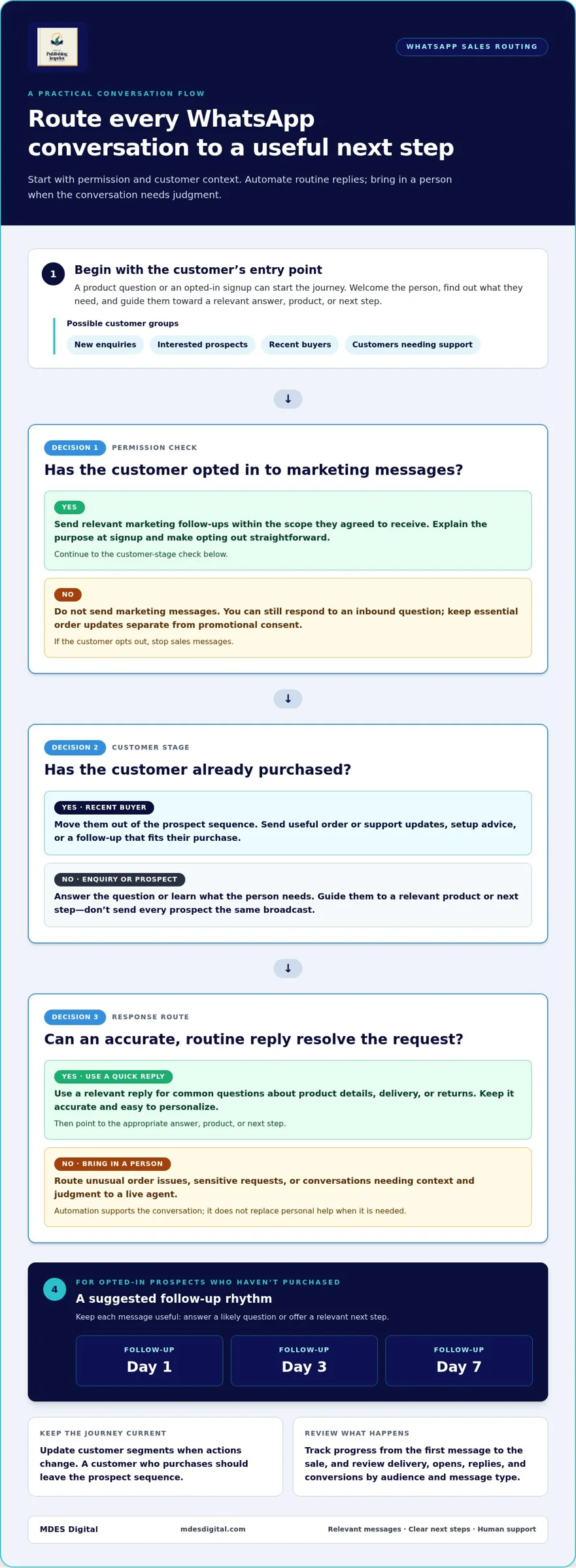
Build the funnel around customer actions, then automate routine replies and follow-ups. Review each stage to make sure automation supports real conversations instead of creating message noise.
-
Build a WhatsApp sales funnel
Start with a clear entry point, such as a product question or an opted-in signup. Send a welcome reply, find out what the person needs, then guide them to a relevant product or next step. After a purchase, provide useful order or support updates. Track progress from the first message to the sale so you can see where conversations stall.
-
Set up automated greetings and quick replies
Write an automated greeting that confirms the conversation and tells people what information to share. Add quick replies for common questions about product details, delivery, or returns. Keep each response accurate and easy to personalize. For example, a quick reply can explain where to find delivery details, while a person handles an unusual order issue.
-
Segment customers into journeys
Use customer actions to create useful groups: new enquiries, interested prospects, recent buyers, and customers needing support. Match each group with relevant replies and updates instead of sending everyone the same broadcast. Targeting recent buyers can yield twice the results of underperforming broadcasts. Keep segments current: customers who have purchased should leave the prospect sequence.
-
Automate lead-nurturing follow-ups
Plan a short follow-up sequence for opted-in prospects who haven’t purchased. One suggested schedule is day 1, day 3, and day 7, with each message answering a likely question or offering a useful next step. Nurtured leads tend to make purchases that are 47% larger than non-nurtured leads. Treat that as a reason to provide relevant guidance, not to send repeated sales prompts.
Use WhatsApp Business automation for repeatable tasks, then review replies, conversions, and opt-outs. Adjust campaign timing and content when customers stop engaging. Automation can support more conversations, but it still needs clear rules and regular review.
Live-agent support and chatbots
Use chatbots for predictable tasks and live agents for decisions that need context. A clear handoff matters: an automated response is useful only if prospects can reach a person when their issue changes.
- Define the chatbot’s role before writing its responses. Give it clear tasks, such as sharing product details, collecting an order number, or directing a prospect to relevant information. Keep its answers within those tasks. If a customer reports a damaged item or makes an unusual request, the bot should recognize its limits and route the conversation to an agent.
- Make the handoff clear. Tell customers when an agent will take over, pass along the conversation history, and give the agent enough context to continue without asking the customer to repeat everything. Shared chat access also helps teams collaborate. Assign an owner to each open chat so replies don’t overlap or go unanswered.
- Prepare agents with response guidance, not rigid scripts. Keep product details, delivery updates, and common issue resolutions current. Agents can use this information to answer consistently while adapting to each customer’s question. For example, a delivery reminder may be automated, but a missed parcel calls for a person who can understand the customer’s situation.
- Review service quality alongside sales activity. Track unanswered chats, handoff outcomes, customer feedback, and whether conversations lead to a suitable next step. In a survey, 82% of respondents reported improved response times. Use that as a prompt to assess your own service, not as a target or guaranteed result. Test chatbot responses against real questions and update them when they cause confusion.
- Keep automation accountable. Review failed answers, opt-outs, and complaints, then refine the bot’s limits and escalation rules. If you’re designing a no-code agent workflow, explore the No Code AI Agent Architecture Blueprint to plan its structure.
MDES Digital (Magehema Digital Entrepreneurship System): WhatsApp Mobile Sales Playbook
MDES Digital (Magehema Digital Entrepreneurship System) offers the WhatsApp Mobile Sales Playbook to help readers turn these ideas into a working sales process. Use it to organize customer conversations, follow-ups, and mobile selling tasks. The aim is deliberate execution: set a clear process, apply it to your business, and refine it as you learn from customer responses.
If you’re also building broader digital business skills, The Practical Digital Ebook and Turn Your Smartphone into a Business offer related learning resources. Choose the material that fits the work you’re doing now. For a structured starting point, visit mdesdigital.com.
Turn Your Next Conversation Into a Better Journey
Don’t try to automate every customer interaction at once. Choose one point where people hesitate, such as comparing options or understanding what happens after a purchase. Improve that moment first. Note what customers ask, which answer helps, and what next step feels natural. Use those patterns to refine your messages and support process.
A WhatsApp sales guide is most useful when it becomes a working routine, not another document to save and forget. Put one improvement into practice, observe how customers respond, and adjust the process thoughtfully. Keep the human touch where judgment matters, and focus automation on clear, repeatable tasks.
If you’re ready to develop your approach, contact MDES Digital (Magehema Digital Entrepreneurship System). Take the next step at a pace you can sustain, and build from what you learn.