 MDES
How to Sell on WhatsApp With Personal Replies and Catalogs
October 29, 2026 · 8 min read
A successful WhatsApp sale starts before the first reply. To learn how to sell on WhatsApp, set up a professional business profile, make products easy to browse in a catalog, and respond with useful, personal messages. A chat may feel informal, but the buying process should be clear.
Quick replies matter, but speed alone won’t help customers understand your offer or choose what to buy. Clear product details, organized contacts, and thoughtful follow-up give every conversation a practical next step.
Build that foundation by organizing your profile and catalog, sorting contacts, and using message templates that still sound natural. Share photos, videos, or other useful media to answer customer questions. Then personalize replies and guide each chat from initial interest to an order. Start with the basics and refine your approach as you learn what customers need.
Key Takeaways
- Build trust before the conversation starts by keeping your business profile complete and your product information clear.
- Use customer details to make saved replies feel personal, then choose photos, video, or audio that answer the buyer’s specific questions.
- Sort contacts by their buying stage so you can send relevant updates and follow up without treating every customer the same.
- Use templates and catalog tools to make routine tasks easier, while keeping your messages accurate, timely, and human.
Table of Contents
- Personalized replies and multimedia sales content
- Using templates, catalogues and automated replies
- Broadcast lists, contact labels, and message templates
- Creating a professional business profile and product catalog
- MDES Digital (Magehema Digital Entrepreneurship System): WhatsApp Mobile Sales Playbook
Personalized replies and multimedia sales content
Use each conversation to help a customer make their next decision, not simply to send more messages. Personal replies, relevant media, and timely follow-up keep the sales process clear.
-
Personalize Replies to Customers
Use the customer’s name and the product details they’ve asked about. Adapt a saved reply to their question, such as confirming a bag’s color or explaining how delivery works. Keep the response concise, then ask one useful follow-up question. Aim to reply to new messages in less than a minute when possible. A 24-hour delay can cost sales momentum, Emma Watson advises. Set an expected response time, such as five hours, if you can’t reply immediately.
-
Nurture Customers Through Sales Conversations
Guide the buyer one step at a time. Ask what they need, answer their question, then suggest a relevant next action, such as viewing a product photo or choosing an option. Address concerns before pushing for a purchase. Use clear photos, short videos, or voice notes when they explain a product better than text. Track response times, common questions, and outcomes to spot delays and unanswered needs.
- Choose WhatsApp Business for direct customer conversations. The WhatsApp Business Platform may suit a business that needs connected systems or structured team messaging. Give WhatsApp a clear role: answer questions, share product information, and help interested buyers move toward an order. Track inquiries, response times, completed sales, and service issues to see where conversations stall and what needs attention.
- WhatsApp commerce policies define permitted sales and prohibited products. List only eligible offerings, and keep product messages within those rules. For US marketing, build consent into your process: request permission, record it, and honor opt-out requests. Privacy obligations depend on the data and messages involved, so collect only the details needed to serve customers. Messaging limits and pricing differ between the Business app and Platform, depending on account setup and message use. Compare the workflows before choosing.
Using templates, catalogues and automated replies
Create repeatable messages for routine questions, while staying involved in every sale. Catalogs, labels, and automated replies can reduce busywork, but make sure useful conversations still get timely attention.
-
Organize Catalogs and Contacts with Labels
Group catalog items by product type or customer need, and keep descriptions and prices current. Buyers comparing options can browse the details instead of asking you to resend them. Label chats by their next action, such as “New order,” “In negotiation,” or “Payment pending.” Review the labels regularly and update each contact’s stage. Move completed orders out of active sales.
-
Automate Responses and Qualify Leads
Write automated replies for common questions, then use one simple question to identify what the customer needs. For example, ask whether they want delivery or pickup before sharing the relevant order steps. Keep the message specific, short, and easy to answer. A saved reply should start the conversation, not pretend to finish it. Review chats where a customer remains in “Payment pending” for more than 24 hours.
Use reminders thoughtfully. A message may help a buyer who forgot an order, but repeated nudges can feel intrusive. For a chat marked “Payment pending,” a reminder after two hours can bring the next step back into view. Review the conversation before sending, and update its label when the customer responds or pays.
-
Set Up Greetings and Away Messages
Write a greeting that welcomes new contacts and tells them what information to send. For example, ask for the product name and preferred option. Set an away message for times when you can’t respond, and give an expected return time only if you can meet it. Don’t promise immediate help when you’re unavailable. Review both messages whenever your hours or sales process changes.
Keep promotions accurate. If an offer truly ends soon, a template can say it has 24 hours left. Remove or edit that message when the offer ends, so customers don’t receive outdated terms.
Build templates around real customer questions, then refine them as you notice gaps. For a practical framework for planning these steps, explore the WhatsApp sales playbook.
Broadcast lists, contact labels, and message templates
Promote your WhatsApp shop in the United States through your own social posts, website, or customer emails. Invite interested people to message you, then use relevant broadcasts to keep them informed.
-
Segment Contacts for Broadcast Lists
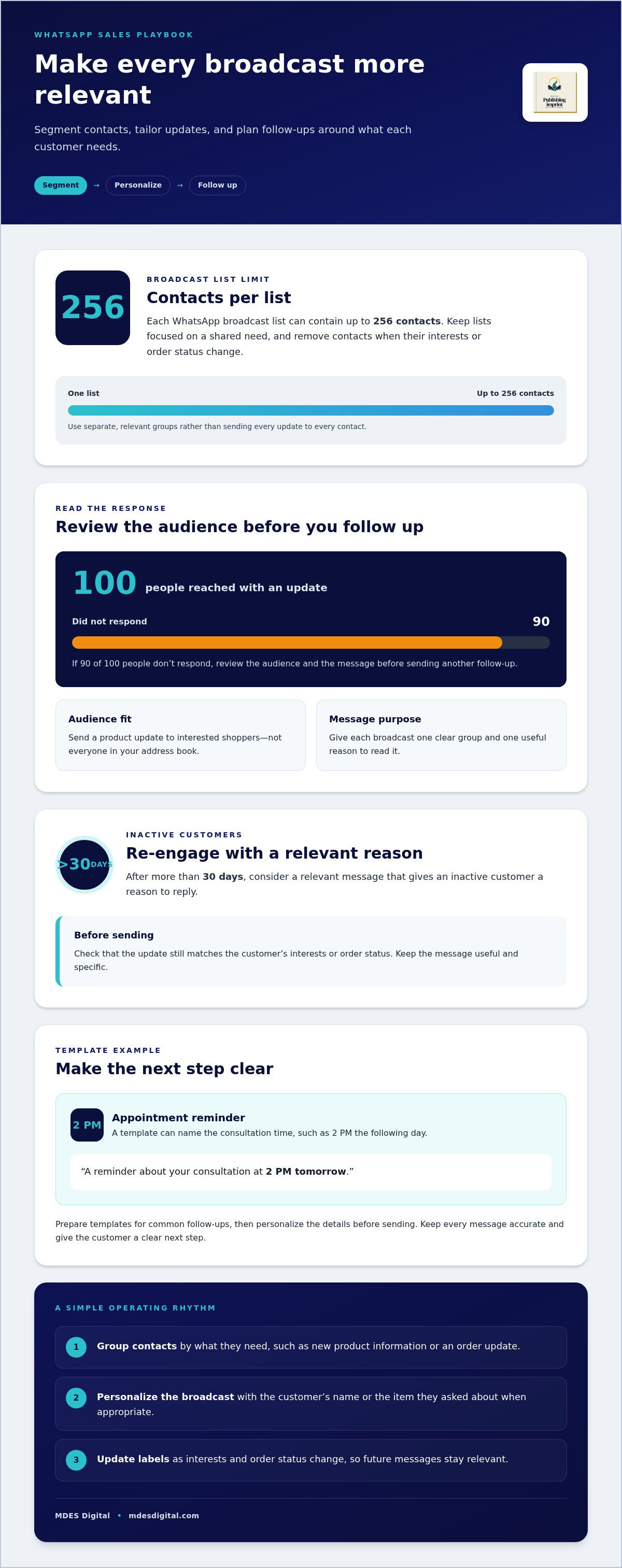
Group contacts by what they need, not simply by when they joined. For example, separate people who asked about new products from customers awaiting an order update. Each WhatsApp broadcast list can contain up to 256 contacts. Keep lists focused, and remove people whose interests or order status have changed. Clear segments make each message more useful and reduce irrelevant updates.
-
Personalize Broadcast Messages
Write each broadcast for one clear group and one useful purpose. Share a product update with interested shoppers, not every contact in your address book. Add a customer’s name or the item they asked about when appropriate. For example, if you reach 100 people with an update and 90 don’t respond, review the audience and message before following up. Re-engage inactive customers after more than 30 days with a relevant reason to reply.
-
Plan Follow-Ups with Message Templates
Prepare templates for common follow-ups, then personalize the details before sending. An appointment reminder can name the consultation time, such as 2 PM the following day. A product follow-up can refer to the option a customer viewed and offer a clear next step. Keep the message accurate, and don’t send a generic promotion to someone waiting for an order update. A template saves typing; the personal detail keeps the conversation relevant.
- After each broadcast, track replies and outcomes. Record which segment received the message, who responded, and which conversations need follow-up. If a customer asks about an order, move them from the prospect group to the appropriate stage. Review your records before the next send to avoid duplicate messages and keep sales conversations organized.
Creating a professional business profile and product catalog
Your profile and catalog answer questions before customers ask them. A clear setup gives anyone learning how to sell on WhatsApp a practical starting point. Make your business details clear and each product easy to assess.
- Complete your business profile with the details customers need before placing an order. Add your business hours, a clear description of what you sell, and accurate contact information. Keep the hours current so buyers know when to expect a response. Use plain language, such as “handmade candles and gift sets,” instead of a broad claim like “quality products.” A complete profile helps customers understand who they’re messaging and what you offer.
- Build your catalog around shoppers’ common questions. Add a clear photo, a direct name, and a useful description for each product. Include details that help customers choose, such as material, size, color, or what comes with the item. Group related products into collections, such as work bags or everyday accessories, so customers can browse without sorting through unrelated items. Learning how to sell on WhatsApp starts with making product choices easy to understand.
- Keep catalog prices current and make delivery and return policies easy to find. Customers comparing products should see accurate prices and understand delivery before placing an order. Write policies in short, direct language. For example, explain how to arrange delivery and what steps apply to a return. Review these details whenever your terms or product range changes.
- Review the catalog from a customer’s point of view. Open each item and confirm the photo matches the description, the price is current, and the collection makes sense. Remove unavailable items so customers don’t ask about products they can’t order. In a chat, share the relevant catalog item instead of a long product list. This gives the customer a focused next step and keeps the conversation centered on the item they want.
Use this profile-and-catalog setup as the base for a practical mobile business. Build a smartphone-based business routine around clear product details and orderly customer conversations.
MDES Digital (Magehema Digital Entrepreneurship System): WhatsApp Mobile Sales Playbook
MDES Digital (Magehema Digital Entrepreneurship System) offers the WhatsApp Mobile Sales Playbook to help turn these steps into a repeatable sales routine. Use it to structure your profile, catalog, replies, and follow-ups, or as a guide while building your process from the ground up.
The playbook is a learning resource, not a substitute for putting the work into practice. Apply its guidance to your products, customer questions, and order flow. Start with one improvement, such as organizing contact stages or clarifying a product description, then use real conversations to identify what to improve next. For broader digital business skills, MDES Digital also offers Turn Your Smartphone into a Business and The Practical Digital Ebook.
Visit mdesdigital.com to explore the WhatsApp Mobile Sales Playbook.
Turn Your Next Conversation Into a Clearer Process
Keep learning how to sell on WhatsApp by treating every conversation as an opportunity to improve your process. Notice where customers pause, what they ask repeatedly, and which details help them decide. Make one practical adjustment and use it consistently. Progress comes from deliberate practice, not from adding more tools or sending more messages.
For a structured guide to your next steps, MDES Digital offers the WhatsApp Mobile Sales Playbook. The Practical Digital Ebook and Turn Your Smartphone into a Business support broader digital business learning. Choose the resource that fits the work in front of you, then apply its guidance to your own products and customer conversations.
Explore resources from MDES Digital and take your next step with focus.